

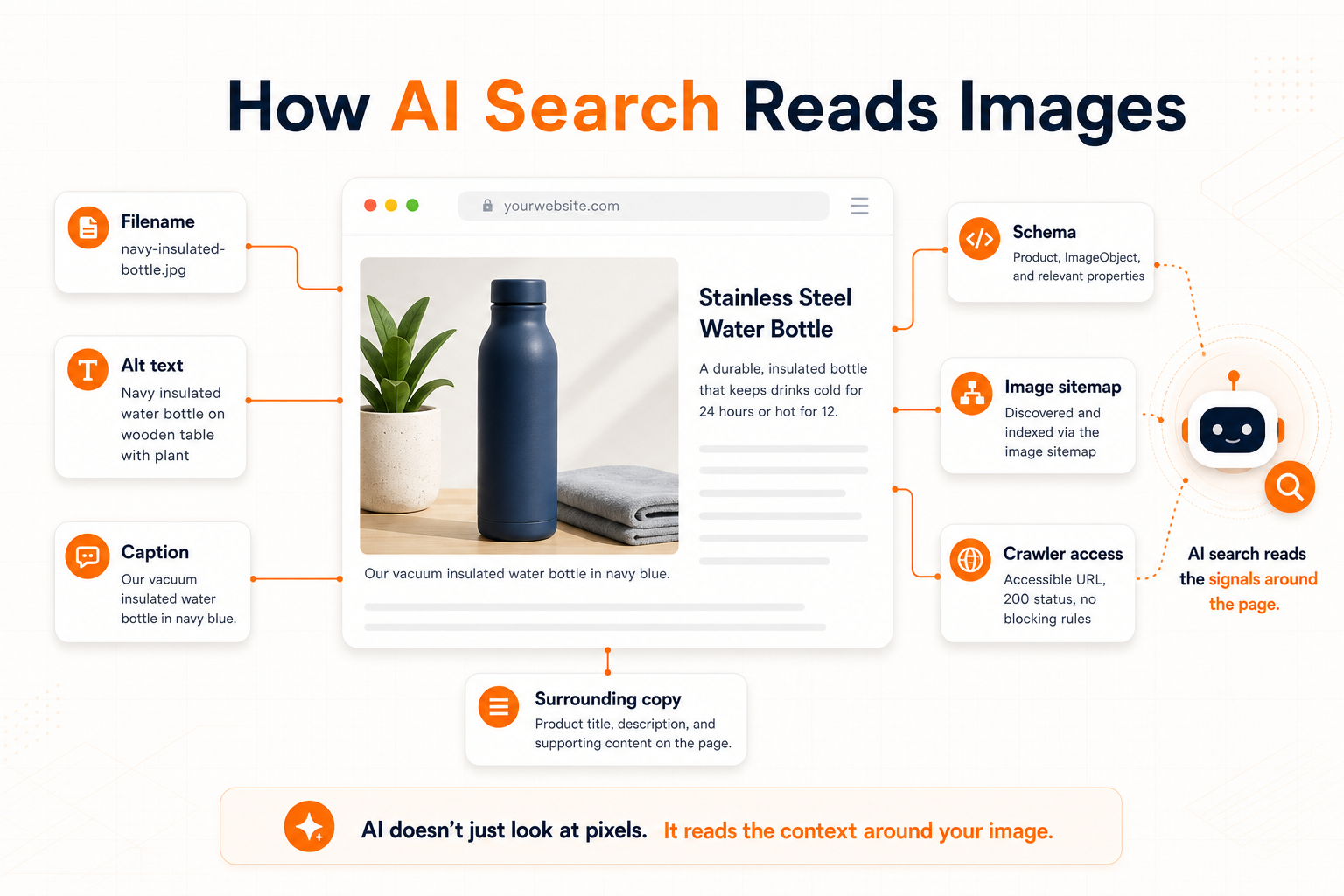
Yes, ChatGPT can see images when you upload them, paste an image URL, or use a feature that explicitly retrieves image results. But for images on your website, AI search systems usually read the crawlable signals around the image: alt text, filename, caption, surrounding copy, structured data, and sitemaps.
That distinction matters. A multimodal model can inspect pixels when an image is part of the prompt, but a search crawler deciding whether to cite your page is not the same thing as a user uploading a photo into ChatGPT. At web scale, AI systems still depend heavily on the text and metadata you publish with each image.
This guide explains what AI assistants can actually access, what image signals matter most, and how to make website images understandable to ChatGPT, Claude, Perplexity, Google AI Mode, and classic image search without breaking accessibility or over-optimizing.
Can ChatGPT see images?
ChatGPT can analyze an image when the image is provided as input. OpenAI's current vision documentation says models can process image inputs supplied as a URL, uploaded file, or base64 image, and can understand visual elements such as objects, shapes, colors, textures, and text inside the image.
But that is not the same as saying ChatGPT automatically sees every image on every web page. When ChatGPT Search, Perplexity, Claude, or another AI answer engine retrieves web pages, it may receive the page HTML, search result metadata, citations, and sometimes image search results. It may not visually inspect every image on the page. The scalable signals are still the ones in your HTML.
The three ways AI systems encounter images
Most confusion comes from mixing three different situations:
| Situation | Can the AI inspect pixels? | What matters most |
|---|---|---|
| User uploads an image | Yes. The image is part of the model input. | Image quality, prompt context, visible text, and the model's vision capability. |
| User gives an image URL | Often yes, if the system can fetch the URL and the file is accessible. | Access permissions, file format, image quality, and any surrounding prompt context. |
| AI search crawls a web page | Not reliably. It may rely on page text and metadata. | Alt text, filename, caption, surrounding copy, schema, OG image, image sitemap, and crawler access. |
If you care about AI search visibility, optimize for the third situation. Your goal is not just to make an image visually clear. Your goal is to give crawlers a truthful, crawlable description of what the image shows and why it matters on the page.
What image signals can AI search read?
These are the signals most likely to survive crawling, indexing, retrieval, and summarization:
- Alt text. Google calls alt text the most important attribute for providing image metadata. It is also the accessibility layer screen readers depend on.
- Filename. Google says filenames give very light clues about the image subject. Very light does not mean useless, especially when the current name is
IMG_0042.jpg. - Caption and nearby text. Google extracts image context from the page, including captions, image titles, and nearby copy. AI systems do the same kind of context gathering.
- HTML image elements. Google recommends standard
imgelements with a crawlablesrc. It does not index CSS background images as images. - Structured data and Open Graph image. Google says preferred images can be supplied through schema properties like
primaryImageOfPageor theog:imagetag. - Image sitemaps. Google's image sitemap docs say sitemaps help it discover images it might otherwise miss, especially images reached through JavaScript.
- Robots and WAF access. AI search crawlers cannot cite what they cannot fetch. Robots.txt, bot protection, and firewall rules affect whether they can reach your pages.
The practical takeaway: the image file and the HTML around it should agree. A product photo named blue-linen-sofa.webp with alt text "Blue linen sofa with oak legs in a bright living room" and nearby copy about that sofa is much easier for search and AI systems to understand than the same photo named DSC_1029.webp with empty alt text.
How do AI crawlers differ from training bots?
AI crawler policy has become more nuanced. The major AI companies now separate search visibility, user-triggered fetches, and training access.
| Provider | Search or retrieval | Training or model improvement |
|---|---|---|
| OpenAI | OAI-SearchBot surfaces sites in ChatGPT search. ChatGPT-User is used for some user-triggered actions. |
GPTBot crawls content that may be used for training future models. |
| Anthropic | Claude-SearchBot improves search result quality. Claude-User fetches content for user-directed requests. |
ClaudeBot collects content that may contribute to training. |
| Perplexity | PerplexityBot is designed to surface and link websites in Perplexity search. Perplexity-User handles user-triggered fetches. |
Perplexity says PerplexityBot is not used to crawl content for foundation-model training. |
Googlebot controls Google Search crawling and visibility. |
Google-Extended is a robots.txt control token for certain Gemini training and grounding uses, separate from Search. |
So the simple rule "block AI bots" is too blunt. If your goal is visibility in AI search answers, you generally want search and user-triggered fetchers to reach public pages. If your goal is to opt out of model training, handle training crawlers separately. Also check your hosting provider, CDN, or WAF. Cloudflare notes that robots.txt is a preference signal, not technical enforcement, and some bot protection settings can block crawlers before they ever read your robots file.
How do you make website images legible to AI search?
Use the same fundamentals that make images work for classic SEO and accessibility:
- Use crawlable HTML. Put meaningful content images in
imgorpictureelements with a realsrcfallback. Avoid placing important images only in CSS backgrounds. - Name the file descriptively. Use lowercase words separated by hyphens:
modern-kitchen-marble-island.webp, notIMG_3847.webp. - Write purpose-based alt text. Describe what matters in context. For a product image, include the product and distinguishing visual details. For a decorative flourish, use
alt="". - Add useful surrounding copy. Place images near the paragraph, product description, recipe step, listing detail, or tutorial section they support.
- Use captions where they help humans. Captions are visible context, so they often help both readers and crawlers understand why the image is there.
- Expose preferred images in metadata. Use representative Open Graph images and relevant schema image properties for key pages.
- Submit images through sitemaps when needed. If images are loaded by JavaScript, hosted on a CDN, or easy to miss, add image sitemap entries with
image:loc. - Allow the right crawlers. Make sure public marketing and content pages are reachable by Googlebot, OAI-SearchBot, Claude-SearchBot, and PerplexityBot if AI search visibility is the goal.
What should your alt text say?
The W3C Web Accessibility Initiative's alt decision tree starts with purpose, not keywords. If the image contributes meaning, write a brief description that conveys that meaning. If it is a link or button, describe the action or destination. If it is purely decorative or redundant with nearby text, use an empty alt attribute.
That is also the best AI-search advice. Keyword-stuffed alt text is bad accessibility and bad SEO. A useful alt sentence gives the model real context. For example:
| Weak | Better |
|---|---|
alt="shoes shoes running shoes best shoes" |
alt="Blue trail running shoes with mud-resistant soles on a rocky path" |
alt="image" |
alt="Renameit workspace showing generated filenames and alt text for uploaded product photos" |
| No alt attribute | alt="" for decorative images, or a concise description for meaningful images. |
For multilingual sites, translate the alt text and captions. Keep image filenames stable, plain, and URL-safe unless you intentionally maintain separate image assets per locale.
Do image filenames matter for AI visibility?
Yes, but treat filenames as a supporting signal, not the whole strategy. Google's image SEO docs say filenames can give very light clues about the subject matter. That is enough reason to replace generic camera names with clear, stable names, especially when you are publishing hundreds of images.
Filenames are also unusually durable. They appear in image URLs, CMS exports, CSV handoffs, developer tickets, CDN logs, and sometimes source citations. When an AI crawler sees /images/leather-tote-bag-brown.webp, it gets a clue that /images/IMG_7421.webp never provides.
Can AI image search find images that normal crawlers miss?
Sometimes, but do not rely on that. Google AI Mode and Lens can understand uploaded images and issue multiple visual searches, and OpenAI web search can return image results alongside text results. Those are user-facing retrieval features. They do not remove the need to publish crawlable image HTML, useful alt text, and image sitemaps.
If an image is important to organic discovery, make it easy to discover through normal crawling first. AI search builds on search and retrieval systems. It does not excuse hidden assets, blocked images, missing alt attributes, or generic filenames.
A quick audit checklist
Before publishing a page with important images, check this:
- Important images use
imgorpicture, not CSS background only. - Each meaningful image has specific alt text that matches the page context.
- Decorative images use
alt="", not missing alt attributes. - Filenames describe the subject in lowercase, hyphen-separated words.
- Images sit near relevant text or captions.
- Page metadata and schema use a representative image.
- JavaScript-loaded or CDN-hosted images are covered by an image sitemap when needed.
- Robots.txt and bot protection allow the search crawlers you want to reach public pages.
How Renameit helps
The hard part is not understanding the checklist. It is applying it to 50, 500, or 5,000 images without burning a week on manual work.
Renameit's website image audit lets you paste a public URL and find images with missing alt text, generic filenames, and oversized files. Then Renameit can generate descriptive, SEO-friendly filenames plus matching alt text in the same pass. The free alt text generator is available without signup for quick fixes, and the CSV export gives developers or CMS teams a clean old-to-new mapping.
If you want the broader workflow, start with the complete image SEO guide, then use the focused guides for writing alt text and naming image files for SEO.
The bottom line
ChatGPT can see images when images are explicitly provided to it. AI search visibility, though, is earned through crawlable signals: useful alt text, descriptive filenames, relevant surrounding copy, image metadata, sitemaps, and crawler access. The best strategy is simple: make each image understandable to humans, accessible to assistive technology, and legible to crawlers at the same time.
Frequently asked questions
Can ChatGPT see images on my website?
ChatGPT can analyze an image when the image is uploaded, provided as a URL, or returned through an image-capable search feature. For normal website crawling, AI search systems usually rely on crawlable page signals such as alt text, filenames, captions, surrounding copy, structured data, and sitemaps rather than visually inspecting every image on every page.
Does alt text help ChatGPT and AI search understand images?
Yes. Alt text is one of the strongest text signals attached to an image. It helps screen reader users, gives Google important image metadata, and gives AI search systems a concise description they can retrieve from the page HTML. The best alt text is accurate, context-specific, and written for the image's purpose, not stuffed with keywords.
Do image filenames matter for AI search?
Yes, as a supporting signal. Google says filenames give very light clues about an image's subject matter. For AI search, a descriptive filename is still useful because it appears in the image URL and raw HTML. A filename like brown-leather-tote-bag.webp communicates more than IMG_7421.webp, especially when paired with good alt text and nearby copy.
Should I block AI crawlers in robots.txt?
It depends on the crawler and your goal. Search and user-fetch crawlers, such as OAI-SearchBot, Claude-SearchBot, and PerplexityBot, affect whether your public pages can appear in AI answers. Training crawlers, such as GPTBot and ClaudeBot, are separate. If you want AI search visibility but not training reuse, handle those agents separately rather than blocking every AI bot.
What is the difference between GPTBot and OAI-SearchBot?
OpenAI documents GPTBot as the crawler for content that may be used to train future generative AI models. OAI-SearchBot is for surfacing websites in ChatGPT search results. They are controlled independently in robots.txt, so blocking GPTBot does not automatically block ChatGPT search, and blocking OAI-SearchBot can prevent a site from appearing in ChatGPT search answers.
Do image sitemaps help AI visibility?
They help discovery. Google's image sitemap documentation says image sitemaps can tell Google about images it might not otherwise find, especially images reached through JavaScript. AI visibility often builds on search and retrieval indexes, so making important images discoverable through standard search infrastructure is still worth doing.
What is the fastest way to make many images AI-search friendly?
Audit the page first, then fix the highest-value signals in batches: missing alt text, generic filenames, and images hidden from crawlers. Renameit can extract images from a public URL, flag missing alt text and generic filenames, generate descriptive filenames plus alt text with vision AI, and export a CSV mapping for CMS or developer handoff.