

Bulk Rename Images Online with AI
Drop a folder full of IMG_3847.jpg files. Let AI suggest clear, descriptive filenames. Review, edit, and download the renamed batch, without installing anything.
Try it free with up to 3 images below. No email or credit card required.
Drag & drop images here
or click to browse
JPG, PNG, WebP, GIF • 3 images free, up to 50 on Pro
Drop your images and we'll open them in the renamer, ready to go.
Bulk image renaming: quick facts
- 50
- images per batch
- 10/day
- free renames
- 28
- languages
- $6/mo
- for Pro, unlimited renames
on Pro; 10 per batch on Free, 3 anonymous
with a free account; 3/day anonymous, unlimited on Pro
for AI alt text and captions, from one upload
or $48/year, with a 14-day money-back guarantee
- Naming styles
- Descriptive, Minimal, Date-based, SEO, and Custom (5 total).
- Formats
- JPG, PNG, WebP, GIF. If a browser can display it, Renameit can rename it.
- Privacy
- Images are processed in memory and permanently deleted right after renaming. Never stored, shared, or used for AI training.
- Output
- Individual files or a single ZIP, plus optional AI alt text and captions in up to 28 languages.
Browser-based AI bulk image renamer: vision AI reads each photo and suggests a descriptive, SEO-friendly filename. No install required.
The folder problem nobody wants to fix manually
Cameras, phones, and screenshots all hand out filenames that mean nothing. They pile up. Renaming them one by one is exactly as fun as it sounds.
$ ls # a typical folder looks like:
- IMG_3847.jpg
- IMG_3848.jpg
- DSC_0042.jpg
- Screenshot 2026-04-12 at 3.14.21 PM.png
- 20240618_142233.jpg
- PXL_20260301_182217.jpg
- … and another 87 just like them.
You cannot find anything. Your future self has no idea what these are. Uploading them to a site, a CMS, or a portfolio means more cleanup later.
Bulk rename images in three steps
Upload, review, download. The whole loop takes about a minute.
1. Upload your images
Drag and drop a batch of photos or screenshots: up to 50 per batch on Pro, 10 on Free, 3 anonymous. JPG, PNG, WebP, GIF. If a browser shows it, Renameit handles it.
2. Let AI suggest filenames
The AI looks at the actual content of each image and suggests clear, descriptive names. Pick a style: Descriptive, SEO, Minimal, Date-based, or your own Custom instructions.
3. Review and download
Edit any suggestion before download. Grab files one at a time or all at once as a single ZIP. Renamed in your browser, never stored on our servers.
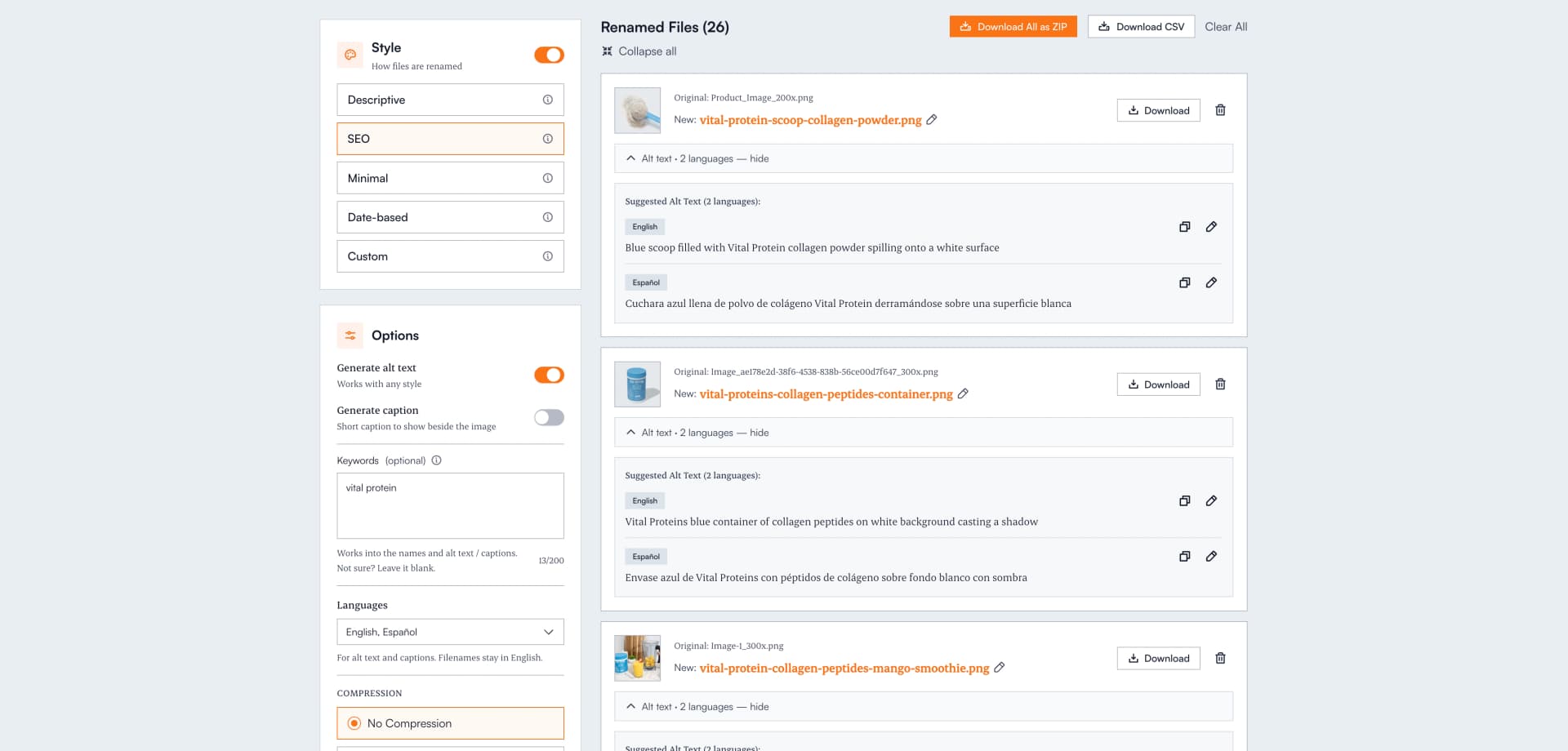
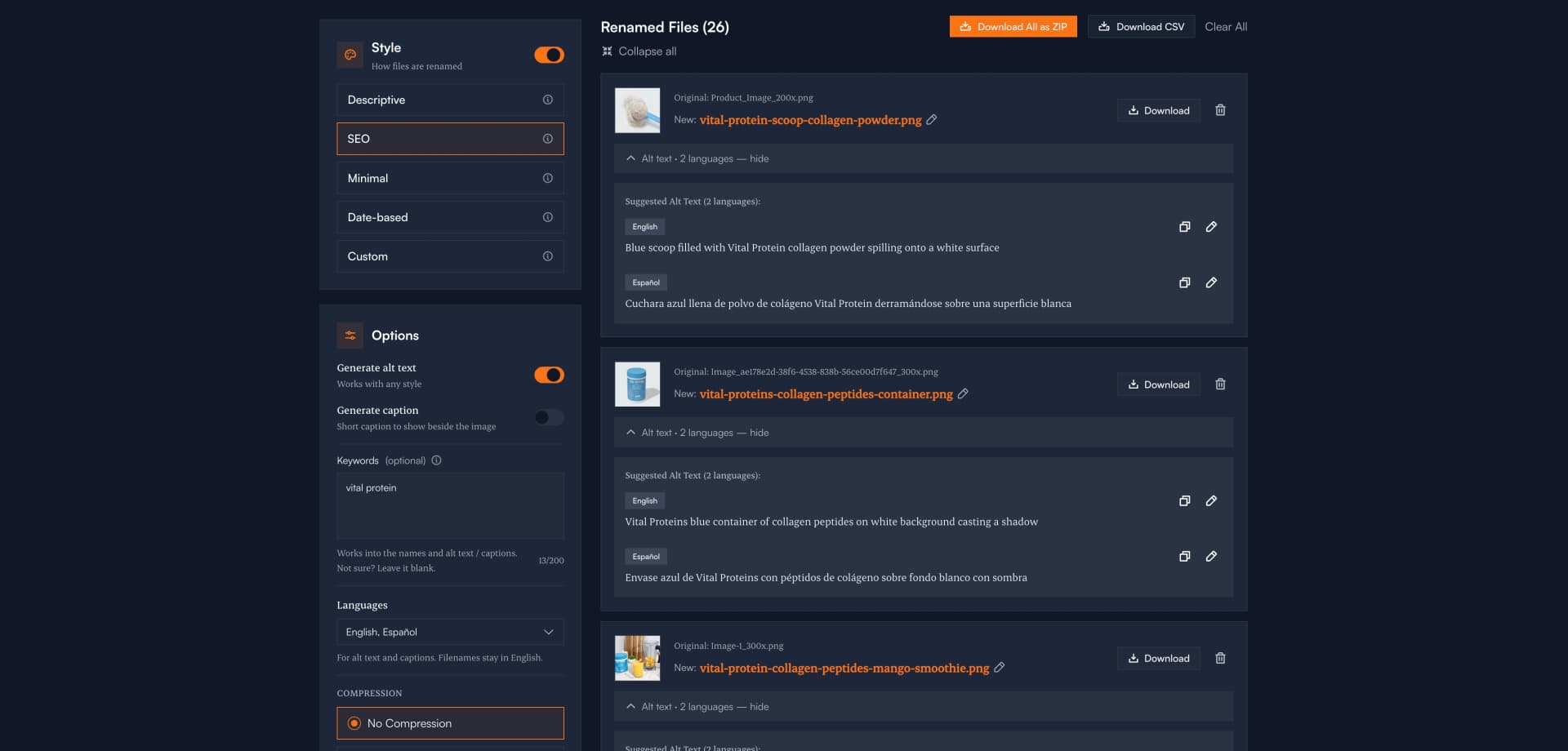
The actual Renameit workspace: a batch of uploaded images with AI-suggested filenames, ready to edit and download.
What renamed images actually look like
Real examples of what the AI suggests in Descriptive and SEO modes. Edit anything you want before downloading.
IMG_3847.jpg
bengal-tiger-close-up-portrait.jpg
Wildlife photo from a DSLRDSC_0042.jpg
modern-kitchen-white-cabinets-marble-island.jpg
Real estate listing photoScreenshot 2026-04-12 at 3.14.21 PM.png
checkout-page-bug-empty-cart-state.png
Bug report screenshot20240618_142233.jpg
blue-running-shoes-side-profile-product.jpg
Ecommerce product shotPXL_20260301_182217.jpg
wedding-first-dance-string-lights.jpg
Phone photo from a wedding shootHow to get an automatic name for every picture
If you searched for an “automatic name of picture” tool, this is it: picture names generated automatically from what the image shows, not from a numbering pattern.
Traditional batch renamers can only apply a pattern you type yourself: vacation-001.jpg, vacation-002.jpg. That's automated numbering, not automatic naming. You still have to know what's in the pictures.
Renameit names pictures automatically in the literal sense: vision AI looks at each photo and writes a name describing its actual content. A beach photo becomes sunset-beach-palm-trees-silhouette.jpg; a product shot becomes blue-running-shoes-side-profile-product.jpg. No pattern to configure, no typing. Upload, review the automatic names, and download. It works the same for one picture or a 50-image batch, online and free to try with no signup required.
Who bulk renames images, and why
Anyone uploading, exporting, or filing more than a handful of photos at a time.
Photographers
Replace DSC_xxxx and IMG_xxxx with names that describe the actual shot, so client deliveries and archives stay searchable.
Ecommerce sellers
Rename product photos before uploading to Shopify, WooCommerce, or Amazon. Cleaner filenames help with image SEO and keep your media library sane.
Real estate & Airbnb
Turn a folder of listing photos into modern-kitchen-marble-island.jpg in one pass. Easier to upload, easier to send to clients.
Content creators & bloggers
Get SEO-friendly filenames for every image before publishing. Turn on AI alt text generation to get matching alt text for any style, no account needed.
Designers
Clean up screenshots, mockup exports, and reference images so your asset library actually stays organized between projects.
Anyone with too many photos
Wedding albums, travel folders, family archives. Replace timestamp filenames with names you can actually search for later.
Why bulk rename with AI instead of by hand
Manual renaming works for five files. It does not work for fifty.
Fast on real folders
A batch of 50 images takes seconds instead of the 30–45 minutes it takes to type names one by one.
Names that describe the image
The AI actually looks at what is in each picture, so the suggested name matches the content, not just the upload date or camera default.
You keep the steering wheel
Every suggestion is editable before download. The AI helps; it does not rename anything without your sign-off.
Download how you want
Grab files individually or as a single ZIP. Optional Pro compression lowers file size for web use in the same step.
Your images stay yours
Images are sent over an encrypted connection, processed in memory, and deleted right after renaming. We do not store your files, share them, or use them to train anything. The renamed images are downloaded straight to your device.
Bulk rename images: common questions
Answers for what people usually ask before uploading.
How do I bulk rename images online?
Open Renameit in your browser, drag and drop your images (up to 50 per batch on Pro), pick a renaming style, and let the AI suggest clear filenames based on what is actually in each image. Review the suggestions, edit any you want to tweak, and download the renamed batch as individual files or a single ZIP. Nothing to install.
Is there a tool that gives an automatic name to a picture?
Yes. Renameit names pictures automatically using vision AI: upload your images, and the AI looks at what each picture actually shows (objects, scene, context) and writes a descriptive filename for it. You get an automatic name for every picture in the batch within seconds, and each suggestion is editable before download.
Can I bulk rename photos for free?
Yes. Anonymous visitors get 3 free renames per day, free accounts get 10 renames per day, and Pro users get unlimited renames. You can start without signing up.
What image formats can I bulk rename?
Renameit handles all common image formats including JPG, PNG, WebP, and GIF. If your browser can display the image, Renameit can rename it.
Do I need to download software to bulk rename images?
No. Renameit runs entirely in your browser. There is nothing to install, no Windows or Mac specific app, and no plugin. It works on any modern browser on desktop or mobile.
Are my images stored or shared after renaming?
No. Your images are processed in memory and permanently deleted right after renaming. We do not store, share, or train on your files. The renamed images are downloaded directly to your device.
Can I edit the AI-suggested filenames before downloading?
Yes. Every suggested filename is editable inline. The AI gives you a useful starting point, but you stay in control of the final name before download.
How many images can I rename at once?
Up to 50 images per batch on Pro; 10 per batch on a free account (10 renames/day); 3 per batch anonymous (3/day). For larger sets, Pro users can run several 50-image batches back to back with no daily limit.
Does bulk renaming images help with SEO?
Yes. Descriptive, keyword-rich filenames help search engines understand what an image shows, which can improve how your pages and images rank in Google Image search. Renameit's SEO mode generates filenames optimized for search discoverability, and you can turn on AI alt text generation for any style on any plan, no account needed (English as a guest; 28 languages on Pro). Try the free AI alt text generator or read more on SEO-friendly file names. Working with images already on a live page? You can extract images from a website and audit them first. If you only need to rename a few photos by hand, our guide to renaming photos on iPhone, Android, Mac, and Windows covers the built-in options.
Stop renaming photos one at a time.
Do it in one batch.
Drop your images, pick a style, and download the renamed batch. Free to start.
Start Renaming ImagesNo credit card. No install. Images deleted after renaming.