

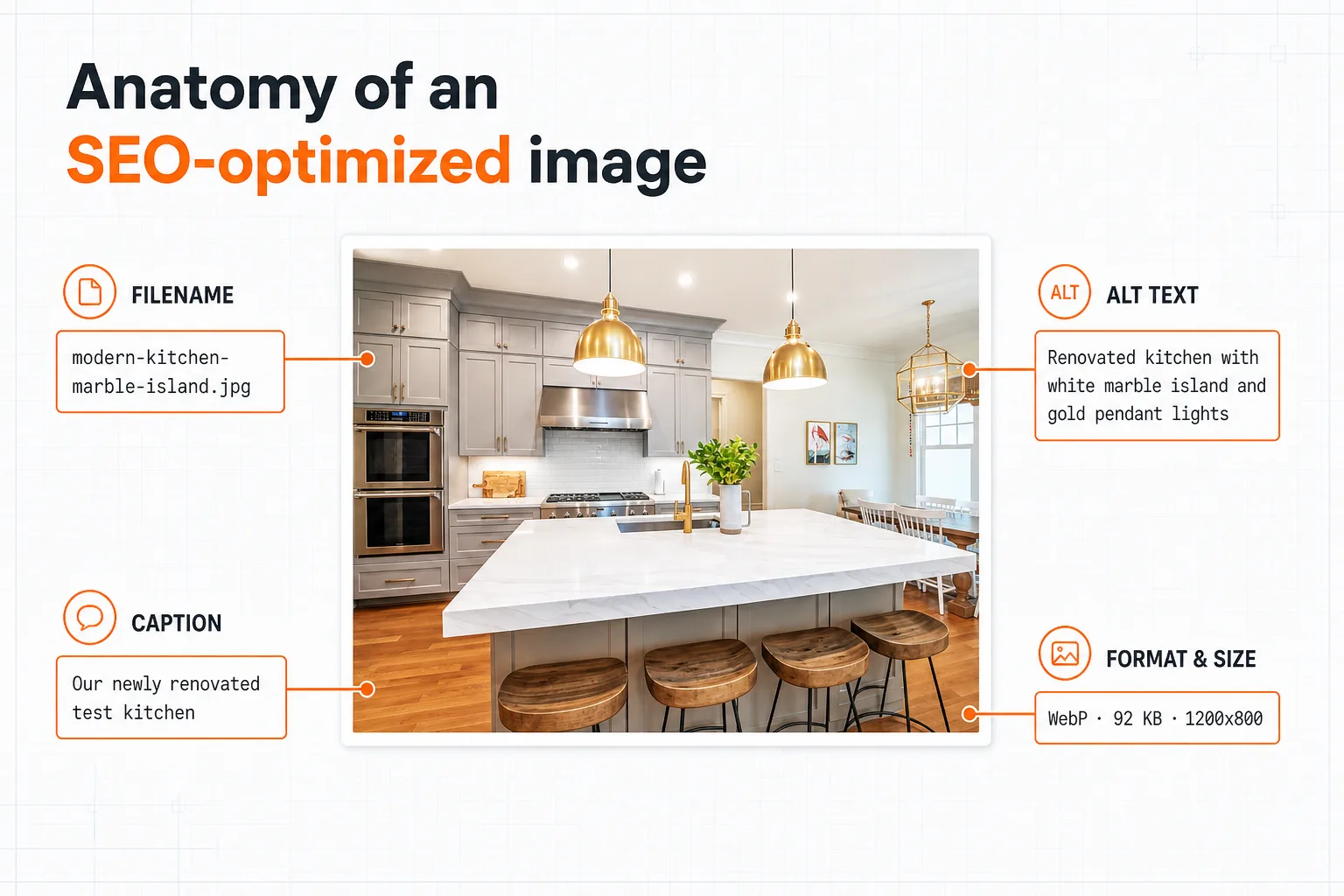
Image SEO is the practice of optimizing images so search engines can find them, understand what they show, and serve them without slowing your page down. It comes down to three things: descriptive text signals (filename, alt text, surrounding copy), clean technical delivery (modern format, right file size, stated dimensions), and discoverability (internal links and an image sitemap).
Done well, image SEO earns you placement in Google Images, reinforces the topical relevance of every page, protects your Core Web Vitals, and increasingly keeps your visuals legible to AI assistants. None of it is hard. The hard part is doing it consistently across hundreds or thousands of images.
This is the hub guide. It walks through the entire workflow at a high level and links to the deep-dive guides for the parts that deserve their own page (filenames and alt text).
What is image SEO?
Image SEO is the set of techniques that help search engines discover, interpret, and rank the images on your site. Google can apply machine vision to a picture, but it still leans heavily on the text you attach to it (the filename, the alt attribute, the caption, and the words around it) to decide what the image shows and which searches it belongs in.
It matters more than most people assume. Visual search is now one of the fastest-growing ways people find things: Google Lens handles nearly 20 billion visual searches a month, and Google reported Lens grew 65% year over year heading into 2025. Image results are also built right into the standard results page, where for product, recipe, travel, real estate, and design queries an image pack often sits above the first organic link. Image SEO is how you compete for that space.
It also pulls double duty. The same work that helps images rank (descriptive alt text, fast-loading files) also improves accessibility and page speed. Few SEO tasks help real users and rankings at the same time. This is one of them.
How do you optimize images for SEO? (step by step)
Every well-optimized image goes through the same pipeline. Here is the whole thing in order; the sections below expand the parts that need it.
- Choose the right format. Use a modern format like WebP or AVIF for photos and graphics, with a JPEG or PNG fallback only where you need it. They deliver the same quality at a fraction of the file size.
- Resize and compress to display size. Don't ship a 4000px photo into a 600px slot. Scale the image to the size it actually renders, then compress it so it's as light as it can be without visible quality loss.
- Give every file a descriptive name.
modern-kitchen-marble-island.jpg, notIMG_4392.jpg. Lowercase, hyphen-separated, a few real words. - Write alt text for every meaningful image. One clear sentence describing what's in the frame and why it's on the page. Decorative images get an empty
alt="". - Place images near relevant text. Google uses the surrounding copy and the nearest caption to understand an image. An image about marble countertops belongs in the paragraph about marble countertops.
- Set explicit dimensions and lazy-load below the fold. Add
widthandheightso the browser reserves space (this prevents layout shift), and addloading="lazy"to images that start off-screen. - Make images discoverable. Link to the pages they live on, and list them in an image sitemap so Google finds even the ones loaded by JavaScript.
Steps 3 and 4 are the text signals search engines read; steps 1, 2, and 6 are the technical delivery that protects your rankings and speed. You need both. A perfectly named image that takes four seconds to load still loses.
Filename vs. alt text vs. caption: what's the difference?
These three get conflated constantly, and they do different jobs. Here is how they compare:
| Signal | What it is | Who reads it | SEO weight |
|---|---|---|---|
| Filename | The name of the image file, part of its URL (marble-kitchen-island.jpg) |
Search engines, AI crawlers, anyone who sees the URL | Light. A "very light clue" per Google, but free and fully yours. |
| Alt text | A hidden HTML description in the alt attribute |
Screen readers, search engines, AI crawlers | Highest of the three. Google calls it the most important image metadata. |
| Caption | Visible text shown next to the image | Human readers (and Google, as nearby context) | Indirect. Read more often than body text, so it earns attention. |
| Title attribute | A hover tooltip (title attribute) |
Mouse users on hover; largely ignored by Google | Negligible. Don't rely on it. |
The takeaway: alt text carries the most weight, the filename is a free supporting signal, and the caption earns its keep with human readers. When all three describe the same subject, you give search engines multiple agreeing signals about what the page covers. They compound.
How should you name image files for SEO?
A good filename describes what's in the image in a few lowercase words separated by hyphens: blue-nike-pegasus-running-shoes.jpg instead of IMG_4392.jpg. Hyphens matter specifically, because Google reads hyphens as spaces between words while underscores get glued into one unreadable token.
The short version of the rules: describe the subject, keep it to roughly 3 to 6 words, use hyphens not underscores, stay lowercase, stick to plain ASCII characters, include one natural keyword (never a pile of them), and apply the same convention to every file. Our full guide to naming image files for SEO covers each rule with before-and-after examples and the mistakes that quietly cost you.
How do you write alt text that helps SEO?
Alt text is the written description stored in the alt attribute. Screen readers speak it aloud, browsers show it when an image fails to load, and search engines read it to understand the image. Google's documentation calls it "the most important attribute when it comes to providing more metadata for an image."
Write one concise sentence (roughly 125 characters is a sensible working limit) that describes both the content and the point of the image. Skip "image of," use keywords naturally and only once, and match the context of the page. Give purely decorative images an empty alt="" so screen readers skip them, but never drop the attribute entirely. The complete rules, good-versus-bad examples, and the truth about the 125-character "limit" are in our guide to alt text for SEO. You can also generate alt text automatically with our free alt text generator.
What's the best image format and file size for SEO?
This is the technical half of image SEO, and it shows up in your Core Web Vitals. A hero image that loads slowly drags down your Largest Contentful Paint, which is a ranking factor and, more importantly, a real cost to the person waiting for your page.
Format. Prefer WebP or AVIF for photographs and complex graphics. Both typically cut file size 25 to 50 percent versus an equivalent JPEG at the same visual quality. Keep PNG for images that need transparency or crisp edges, and SVG for logos and icons. Make sure the file extension matches the actual format; a WebP file renamed to .jpg confuses browsers and crawlers.
Size. Resize the image to the largest size it will actually display, then compress it. Serving a 3MB, 4000px photo into a 600px column wastes bandwidth and hurts your LCP. For images that repeat at different breakpoints, use responsive srcset so phones get a smaller file than desktops.
Loading. Add explicit width and height attributes so the browser reserves the right space and your layout doesn't jump as images load. Lazy-load below-the-fold images with loading="lazy", but never lazy-load your hero image; that one should load as early as possible.
One caution: compression is a real win, but it's a crowded, commoditized topic and it isn't where most sites are losing. If your images already load reasonably fast, your bigger opportunity is almost always the text signals (filenames and alt text) that most sites skip entirely.
How do you get images indexed? (image sitemaps)
Google can only rank an image it has discovered. Most images are found through normal page crawling, but images loaded by JavaScript, served from a CDN, or embedded in CSS are easy to miss. An image sitemap is how you hand Google the full list.
You don't need a separate file. You can add image:image entries inside your existing XML sitemap, where the only required field per image is its location (image:loc). For most content sites that's enough; a dedicated image sitemap pays off mainly when you have a very large or heavily dynamic image library. After that, confirm coverage in Google Search Console's performance report by switching the search type to "Image" and watching impressions over the following weeks.
Do filenames and alt text matter for AI search?
Yes, and this is the newest reason to take image SEO seriously. AI crawlers like GPTBot, ClaudeBot, and PerplexityBot parse your raw HTML when deciding what to cite. They generally don't run vision models on every image they encounter; it's too expensive at that scale. So for an AI assistant, your image is effectively its filename plus its alt text.
If a shopper asks an assistant for "modern kitchens with marble islands" and your gallery is full of DSC_0042.jpg files with empty alt attributes, your photos contribute nothing to whether you get mentioned. The same gallery with descriptive filenames and alt text gives the model real text to match against. The image SEO fundamentals that have worked for a decade have quietly become the way visual content stays legible to AI answers too.
The image SEO checklist
Run every image (or every batch) through this before it goes live:
- Format: WebP or AVIF where possible, with the extension matching the real format.
- Size: resized to display dimensions and compressed; responsive
srcsetfor images that scale. - Filename: descriptive, lowercase, hyphen-separated, ASCII, 3 to 6 words, no keyword stuffing.
- Alt text: one clear sentence on every meaningful image; empty
alt=""on decorative ones; attribute never omitted. - Context: placed near the relevant text, with a caption where it helps the reader.
- Performance: explicit
widthandheight;loading="lazy"below the fold; hero image loaded eagerly. - Discovery: linked from a crawlable page and listed in your image sitemap.
- Measurement: tracked in Search Console's Image search-type report.
How do you optimize hundreds of images at once?
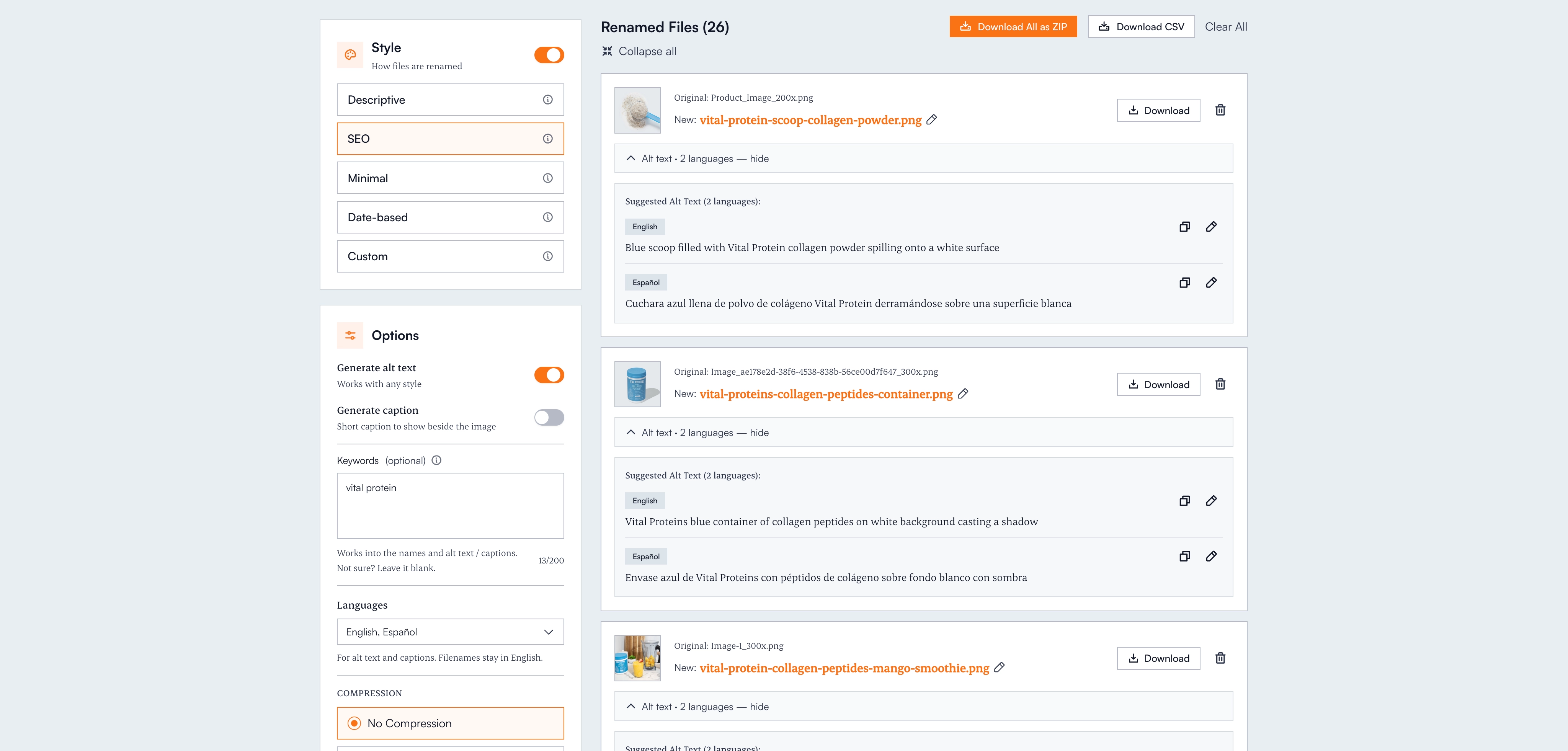
Here is the honest catch: the checklist above is easy for one image and brutal across a real library. Formats and compression can be handled by your build pipeline or CDN, but the two highest-value signals (descriptive filenames and alt text) need a human to look at each image and write something true about it. At a minute per image, a 600-photo catalog is a week of work, which is exactly why most sites never do it.
This is the job Renameit was built for. Vision AI looks at what's actually in each image and writes a descriptive, correctly formatted filename for it, plus matching alt text (in up to 28 languages on Pro) in the same pass. Every suggestion is editable before you download, the CSV export maps old filename to new filename and alt text for a clean CMS or developer handoff, and images are deleted immediately after processing. You can try it free without signing up.
Already have a live site? Paste its URL into the image SEO audit to list every image a page references and flag the ones missing alt text, using generic filenames, or oversized, then fix them in one go. And if your images are still stuck on your phone, here's how to rename photos on iPhone, Android, Mac, and Windows first.
The bottom line
Image SEO is two jobs that have to happen together: give each image clear text signals (a descriptive filename and one good alt sentence, near relevant copy) and deliver it cleanly (modern format, right size, stated dimensions, in your sitemap). The fundamentals are simple and Google-documented. They reward image search, page relevance, Core Web Vitals, accessibility, and AI visibility all at once.
The only real barrier is scale, and that barrier is gone. Every image on your site is either working for you or sitting silent. Now there's no excuse to leave them quiet.
Frequently asked questions
What is image SEO?
Image SEO is the practice of optimizing images so search engines can discover, understand, and rank them without slowing your page down. It combines text signals (a descriptive filename, alt text, and nearby copy), technical delivery (a modern format like WebP, the right file size, and stated dimensions), and discoverability (internal links and an image sitemap). Done well it earns placement in Google Images, reinforces page relevance, and keeps your visuals legible to AI search.
How do I optimize images for SEO step by step?
Choose a modern format (WebP or AVIF), resize and compress to display size, give every file a descriptive lowercase hyphenated name, write one clear sentence of alt text for each meaningful image, place images near relevant text, set explicit width and height plus lazy-loading below the fold, and list your images in an XML sitemap. The text signals (filename and alt text) are what search engines read; the technical steps protect your speed and Core Web Vitals.
What matters most for image SEO: filename or alt text?
Alt text. Google calls it the most important attribute for providing image metadata, while the filename is described as only a 'very light' clue. Both are free and fully under your control, and they reinforce each other, so the right move is to do both. When the filename, alt text, caption, and surrounding text all describe the same subject, the signals compound.
What is the best image format for SEO?
WebP or AVIF for photos and complex graphics. They deliver the same visual quality as JPEG at roughly 25 to 50 percent smaller file sizes, which helps your Largest Contentful Paint and Core Web Vitals. Use PNG when you need transparency, SVG for logos and icons, and always make sure the file extension matches the actual format.
Do I need an image sitemap?
It helps, especially if images load via JavaScript, come from a CDN, or are embedded in CSS, since those are easy for Google to miss. You don't need a separate file: you can add image entries inside your existing XML sitemap, where the only required field is the image location. A dedicated image sitemap mainly pays off for very large or heavily dynamic image libraries.
Does image SEO matter for ChatGPT and AI search?
Yes. AI crawlers like GPTBot, ClaudeBot, and PerplexityBot read raw HTML and generally don't run vision models on every image, so the filename and alt text are usually the only description of your image they get. Descriptive filenames and alt text keep your visual content legible to AI answers, which is becoming a meaningful source of visibility on its own.
How do I optimize hundreds of images without doing each one by hand?
Formats and compression can be automated by your build pipeline or CDN, but descriptive filenames and alt text traditionally need a person to look at each image. An AI tool like Renameit closes that gap: vision AI reads each image and generates an SEO-friendly filename plus matching alt text, all editable before download, with a CSV export that maps old to new filenames for a CMS or developer handoff.