

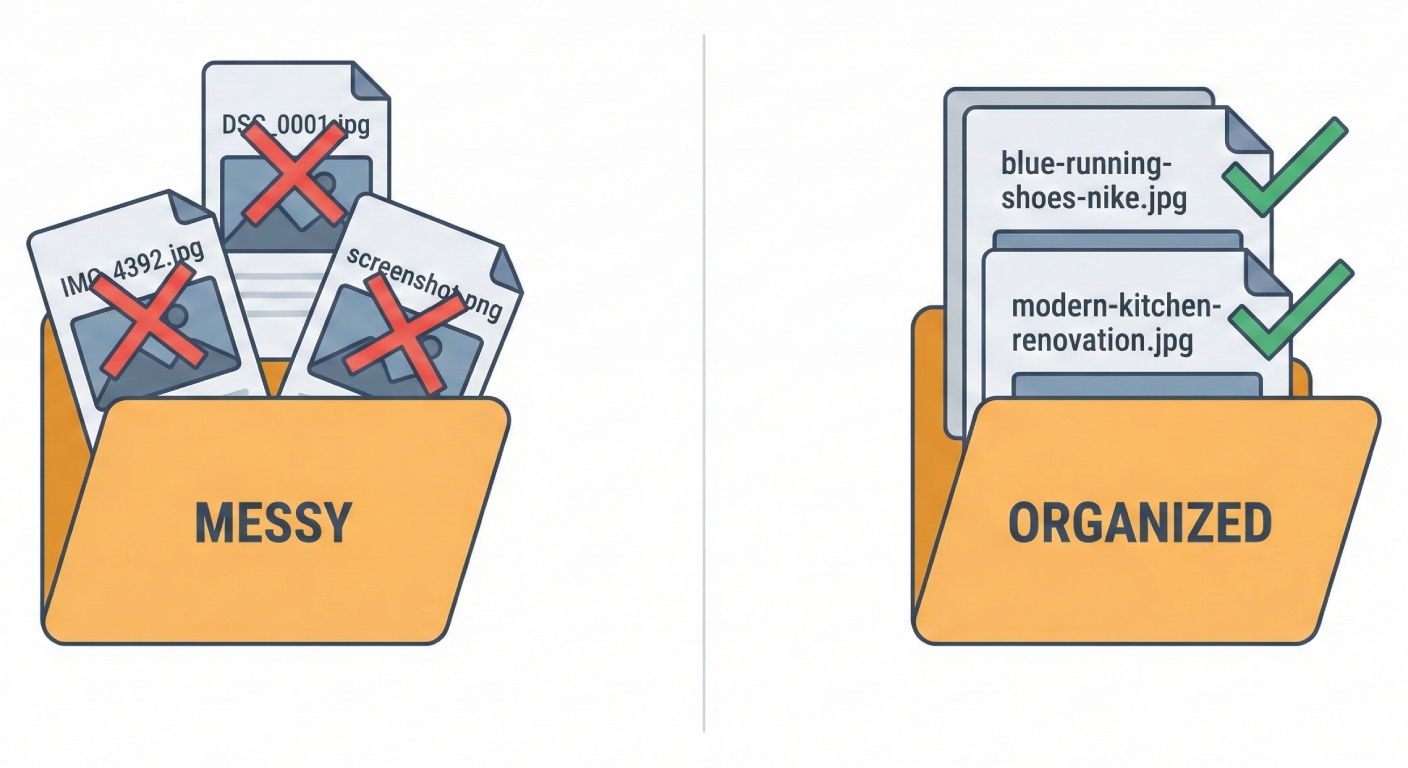
Do image file names affect SEO? Yes. Google's own documentation says the filename gives it "clues about the subject matter of the image" and recommends short, descriptive names: my-new-black-kitten.jpg over IMG00023.JPG. It's a small signal on its own, but it's free, you control it completely, and it compounds with alt text, captions, and page context.
This guide covers exactly how search engines use file names, the seven rules for naming images for SEO, real before-and-after examples, the mistakes that quietly hurt you, and how to fix a backlog of thousands of badly named images without renaming them by hand.
Do image file names affect SEO?
They do, and Google says so directly. Its image SEO best practices state that "the filename can give Google very light clues about the subject matter of the image," and tell site owners to use filenames that are "short, but descriptive" while avoiding generic names like image1.jpg or pic.gif.
That phrase "very light" deserves honesty: a perfect filename will not rescue weak content, and it carries less weight than your alt text or the words around the image. But image SEO is cumulative. When the filename, alt text, caption, and surrounding copy all describe the same subject consistently, you give Google (and increasingly, AI search engines) multiple agreeing signals about what the image shows and which searches it belongs in.
The stakes are bigger than most people assume. Visual search has become one of the fastest-growing ways people find things: Google Lens now handles nearly 20 billion visual searches a month, and Google reported Lens grew 65% year over year heading into 2025. Image results are also built directly into the standard results page, where for product, food, travel, real estate, and design queries they often appear before the first organic link. Images named DSC0001.jpg simply don't compete there.
How do search engines read image file names?
Search engines can't "see" images the way humans do. Google applies some machine vision, but it still leans heavily on text signals to decide what an image contains and when to show it. The filename is one of the first pieces of text attached to your image. It's part of the image URL itself.
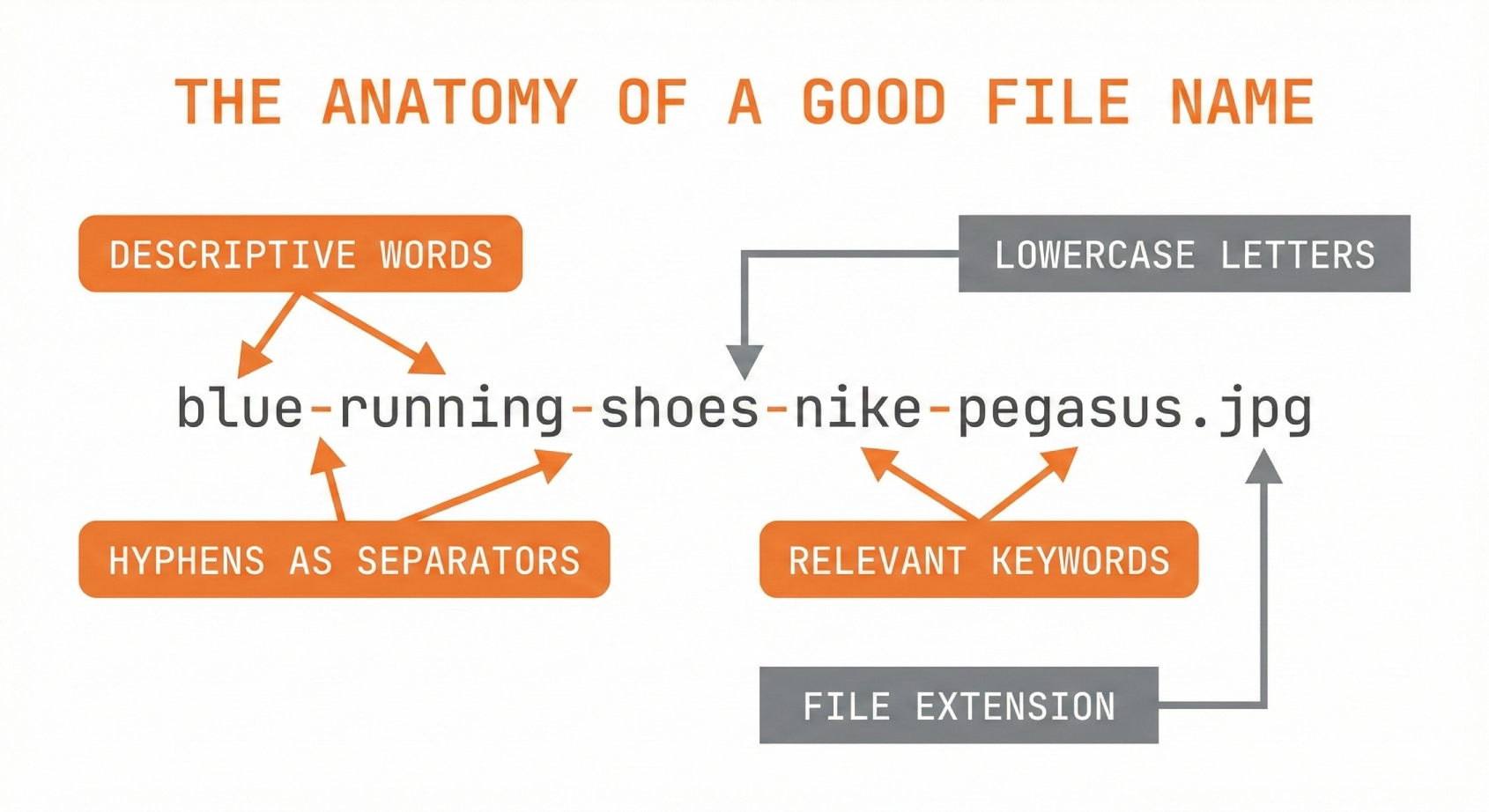
When you name a file blue-running-shoes-nike-pegasus.jpg instead of product_photo_final_v2.jpg, you're handing the crawler indexable words. That one filename tells Google the image shows running shoes, the shoes are blue, and they're a Nike Pegasus specifically: three searchable concepts it would otherwise have to guess.
Formatting determines whether those words get parsed at all. Per Google's own file naming guidance, search engines interpret hyphens in filenames as spaces between words, while underscores are generally not recognized as separators. So blue-running-shoes.jpg is read as three words; blue_running_shoes.jpg may be read as one unrecognizable token.
There's a newer reason to care, too: AI assistants. Crawlers like GPTBot, ClaudeBot, and PerplexityBot read your raw HTML, where the filename (in the src attribute) and the alt text are often the only information they get about an image, because they generally don't execute JavaScript or run vision models on every page they crawl. Descriptive filenames are part of being legible to AI search.
How to name images for SEO: 7 rules
Every well-named image file follows the same pattern. Here is the complete checklist:
- Describe what's actually in the image. Name the subject, not the project status.
homemade-sourdough-bread-sliced.jpgbeatsphoto-final-v2.jpgevery time. - Keep it to roughly 3–6 words. Google asks for "short, but descriptive." Long enough to identify the subject, short enough to stay readable in a URL.
- Separate words with hyphens. Hyphens are parsed as spaces; underscores are not. Never use actual spaces, which become
%20in URLs. - Use lowercase only. Many servers treat
Photo.jpgandphoto.jpgas different files, which creates broken links and duplicate URLs. - Stick to standard ASCII characters. Letters, numbers, and hyphens. Accented or non-Latin characters get URL-encoded into unreadable strings.
- Include a keyword people actually search, once, naturally. If the image shows a modern kitchen with a marble island,
modern-kitchen-marble-island.jpgcaptures real search phrases. Don't force terms the image doesn't show. - Be consistent across your whole library. Pick a convention like
[subject]-[detail]-[detail].jpgand apply it to every upload. Consistency is what makes the other six rules stick.
Before and after: real filename examples
Here's what these rules look like applied to the kinds of files everyone actually has:
| Before | After | Why it works |
|---|---|---|
IMG_4392.jpg |
blue-nike-pegasus-running-shoes.jpg |
Product, color, and model: three searchable terms instead of zero |
DSC_0042.jpg |
modern-kitchen-marble-island.jpg |
Matches how people actually search for kitchen ideas |
Screenshot 2026-01-14.png |
renameit-batch-rename-dashboard.png |
Describes what's on screen; no spaces to turn into %20 |
final_FINAL_v3_approved.jpg |
q4-campaign-hero-banner.jpg |
Findable in your asset library years later |
PXL_20260301_182217.jpg |
wedding-first-dance-string-lights.jpg |
Describes the moment in the photo, not which phone took it |
Is IMG_1234.jpg actually bad for SEO?
Camera-default names won't get you penalized. There's no ranking demotion for IMG_1234.jpg. The cost is pure opportunity: a default name contributes nothing, so the image can only be understood from its other signals. Multiply that across every image on your site and you've silenced an entire layer of relevance information. These are the patterns that waste it:
Camera defaults. IMG_4521.jpg, DSC_0042.CR2, PXL_20260301.jpg: the SEO equivalent of a blank page. They describe the device, never the subject.
Generic descriptions. photo.jpg, image.png, screenshot.png: barely better than defaults, and they collide with every other file named the same way.
Keyword stuffing. Overcorrecting hurts too. best-cheap-affordable-running-shoes-nike-adidas-2026-buy-now.jpg reads as spam to search engines and to humans. One natural keyword phrase is the ceiling.
Spaces and special characters. Spaces become %20 in URLs; accented and non-ASCII characters get percent-encoded into noise. Both make links ugly, fragile, and harder to share.
Inconsistent formatting. Mixing Product Photo.jpg, product_photo.jpg, and productphoto.jpg makes libraries unsearchable and signals sloppiness to clients and collaborators.
Caveat: don't translate your file names
If the same image appears on multiple language versions of your site, keep one filename and one URL. Google's John Mueller advises keeping a single version: duplicate copies of the same image under translated filenames just get folded together as duplicates, and one canonical URL "makes it a lot easier for crawling and image indexing." Localize the alt text and captions for each language instead (that's the translatable layer) and keep filenames in clean ASCII.
Do good file names matter beyond Google?
Search is the headline benefit, but descriptive names pay off everywhere the file travels:
Asset management. When you're searching thousands of images, q4-campaign-hero-banner.jpg is findable in seconds. final_FINAL_v3_approved.jpg is a guessing game.
Accessibility. Screen readers fall back on the filename when alt text is missing. A descriptive name is a safety net for visually impaired users.
Client deliverables. Photographers and designers who deliver cleanly named files look more professional, and their clients can actually use the files without renaming them first.
Clean URLs. Filenames appear in image URLs. Descriptive names create links you can share without embarrassment.
AI visibility. As AI assistants answer more product and visual questions, the filename + alt text pair is frequently all they can read about your images. Good names keep you legible to that growing audience.
How do you rename hundreds of images at once?

Here's where most people give up: the rules are easy, but applying them to a backlog of thousands of images is brutal. Renaming each file by hand (looking at it, thinking of keywords, formatting correctly, staying consistent) takes a working day per few hundred images. Most people stay disciplined for a week, then go right back to uploading IMG_8847.jpg.
This is the problem AI renaming tools exist to solve. Renameit uses vision AI to look at what's actually in each photo and write a descriptive, correctly formatted filename for it. It handles up to 50 images per batch on Pro (10 per batch on the free plan), and every suggestion is editable before you download. It generates matching alt text and captions in up to 28 languages from the same upload, and images are deleted immediately after processing.
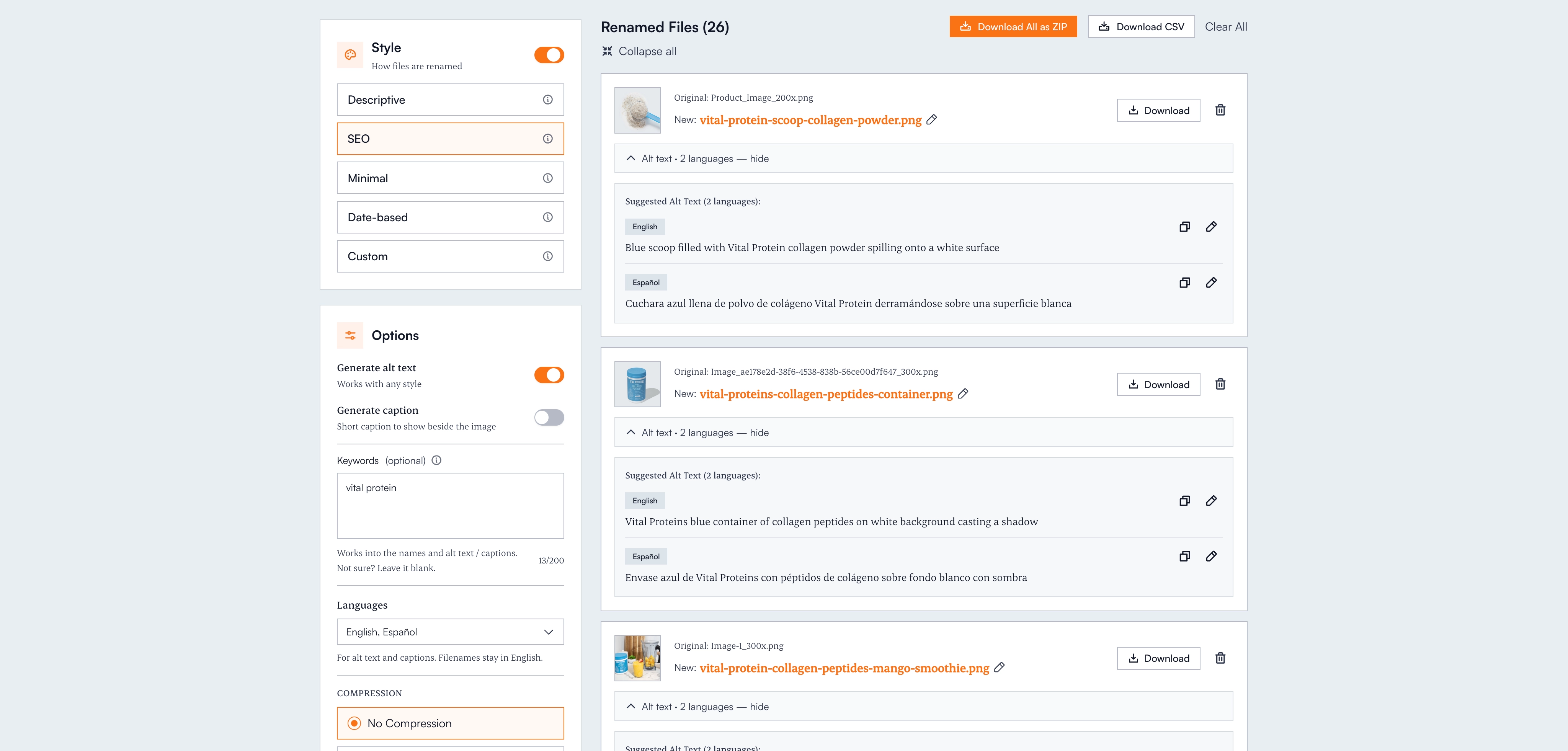
What used to be a full day of mind-numbing work becomes: drag in the folder, review the names, download the batch.
A practical action plan
1. Audit your current files. Open your site's media library and count how many files have descriptive names versus camera defaults. That's your scope.
2. Set a naming convention. Write down a format, for example [subject]-[detail]-[detail].jpg, and make it the rule for every upload going forward.
3. Tackle the backlog in batches. Those existing poorly named files are a missed signal on every page they're on. Bulk rename your images online rather than fixing them one at a time.
4. Pair filenames with alt text. The two signals reinforce each other. If you're generating filenames with AI anyway, generate the alt text in the same pass. Our guide to alt text for SEO covers how to write it well.
5. Monitor image performance. In Google Search Console, switch the performance report to "Image" search type and watch impressions and clicks as your renamed images get recrawled. Expect movement over weeks, not days.
The bottom line
Image file names are a real, Google-documented SEO signal: light on its own, meaningful in aggregate, and one of the few you control completely at upload time. Descriptive, hyphenated, lowercase, 3–6 word filenames make your images eligible for image search, reinforce your pages' topical relevance, keep you readable to AI crawlers, and make your own library manageable.
Every image on your site is either contributing that signal or sitting silent. Fixing it is no longer a manual job. Your files deserve better names, and now there's no excuse not to give them.
Frequently asked questions
Do image file names affect SEO?
Yes. Google's image SEO documentation says filenames give it clues about an image's subject and recommends short, descriptive names over defaults like IMG00023.JPG. It's a light signal individually, but it compounds with alt text, captions, and surrounding page content, and it's entirely under your control.
Should I use hyphens or underscores in image file names?
Hyphens. Search engines interpret hyphens as spaces between words, so blue-running-shoes.jpg is read as three words. Underscores are generally not recognized as word separators, which means blue_running_shoes.jpg may be treated as one meaningless token. Never use actual spaces, which turn into %20 in URLs.
How long should an image file name be?
Aim for 3–6 words (roughly under 60 characters). Google recommends filenames that are short but descriptive: long enough to identify the subject, short enough to stay readable in a URL. One natural keyword phrase is plenty; stuffing more in looks spammy.
Does renaming images on a live website hurt SEO?
Renaming changes the image URL, so Google has to recrawl and reindex it, and image rankings can dip temporarily. Update every reference to the new filename (or redirect the old URL), then let it recrawl. For images that currently have meaningless default names, the long-term gain outweighs the short reindexing window. Do it once, with a proper convention, rather than repeatedly.
Do image file names matter for ChatGPT and AI search?
Yes, arguably more than for classic search. AI crawlers like GPTBot, ClaudeBot, and PerplexityBot read raw HTML and typically don't run vision models on every image they encounter, so the filename in the src attribute and the alt text are often the only description of your image they get. Descriptive names keep your images legible to AI answers.
Should I translate image file names for a multilingual site?
Not if the same image serves every language version. Google's John Mueller advises keeping one filename and URL per image, since translated duplicates just get consolidated as duplicate content. Keep filenames in clean ASCII and localize the alt text and captions instead; that's the layer meant to be translated.