

Alt text (alternative text) is a written description of an image stored in the HTML alt attribute. Screen readers speak it aloud, browsers show it when an image fails to load, and search engines read it to understand what the image shows.
It also pulls double duty for SEO. Google's image documentation calls alt text "the most important attribute" for providing image metadata. That makes it one of the rare pieces of website work that helps real people and rankings at the same time.
This guide covers what alt text is, whether it actually helps SEO, the rules for writing it well, good and bad examples, the truth about the 125-character "limit," and how to handle a site with hundreds of images that have none.
What is alt text?
Alt text lives inside the alt attribute of an HTML image tag:
<img src="bengal-tiger-close-up-portrait.jpg"
     alt="Bengal tiger resting in tall grass, looking directly at the camera" />
Most visitors never see it. But it's working in four places at once:
- Screen readers speak the alt text aloud for blind and low-vision visitors. For them, the alt text is the image.
- Browsers display it in place of the image when the file fails to load or a connection is slow.
- Search engines use it (alongside computer vision and page context) to decide what the image shows and which searches it belongs in.
- AI assistants read it when their crawlers parse your HTML, since most of them don't run vision models on every image they encounter.
One clarification that trips people up: alt text is not the caption. A caption is visible text next to the image, written for sighted readers. The title attribute is a third thing entirely (a hover tooltip that search engines largely ignore). Alt text is the hidden description in the markup, and it's the one that matters most for accessibility and search.
Does alt text help SEO?
Yes. Google's image SEO documentation is unambiguous: "The most important attribute when it comes to providing more metadata for an image is the alt text." Google uses it together with its vision algorithms and the surrounding page content to understand the subject of an image, and it serves as anchor text when an image is a link.
In practice, alt text helps your SEO in three ways:
1. Image search rankings. Descriptive alt text makes images eligible to rank in Google Images, which accounts for a meaningful share of all searches. For products, recipes, travel, interiors, and anything visual, image results often sit above the classic blue links.
2. Page-level relevance. When your alt text, filename, caption, and surrounding copy all describe the same subject, you're giving Google multiple agreeing signals about what the page covers. No single one is heavy, but they compound. Alt text is one piece of a bigger picture; our complete guide to image SEO covers how all the signals fit together.
3. AI search visibility. Crawlers for ChatGPT, Claude, and Perplexity read raw HTML. The alt attribute is frequently the only description of your image they get. More on this below.
Keep expectations honest: alt text is a light signal on its own. It will not rescue a weak page. But it's free, fully under your control, and it improves accessibility at the same time, which makes it one of the easiest wins in SEO.
How to write alt text: 7 rules
Good alt text answers one question: if the image disappeared, what words would need to take its place? Here are the rules, drawn from Google's guidance, the W3C's alt decision tree, and accessibility practice:
- Describe the content and the point of the image. Not just what's in the frame, but why it's on the page. A photo of a stand mixer on a recipe page might be "Stand mixer creaming butter and sugar for chocolate chip cookie dough", not just "a mixer".
- Keep it to roughly one concise sentence. Long enough to convey the meaning, short enough that a screen reader user isn't trapped listening to a paragraph they can't pause.
- Skip "image of" and "photo of". Screen readers already announce it as an image. Starting with filler wastes the listener's time. Saying it's a painting, chart, or logo is fine when that matters.
- Use keywords naturally, once. If the image genuinely shows a marble kitchen island, "modern kitchen with marble island and gold pendant lights" is good alt text that happens to contain search terms. Stacking keywords is stuffing, and Google explicitly warns it can get your site seen as spam.
- Match the context of the page. The same photo needs different alt text on a product page ("Women's trail running shoe in sage green, side view") than in a blog post about trail safety ("Hiker's shoes on a rocky descent"). Context decides what matters.
- For functional images, describe the action. If the image is a button or link, the alt text should say what it does ("Search" or "Download the pricing PDF"), not what it looks like ("magnifying glass icon").
- End with a period. Small detail, real payoff: it makes screen readers pause naturally after the description instead of running into the next element.
Alt text examples: good vs. bad
Here's how these rules play out on real images:
| Image | Bad alt text | Good alt text |
|---|---|---|
| Product photo | shoe |
Blue Nike Pegasus running shoe with white sole, side view |
| Recipe photo | image of food |
Sliced sourdough loaf on a cutting board with an open crumb |
| Real estate listing | kitchen kitchen remodel kitchen ideas modern kitchen |
Renovated kitchen with white marble island and gold pendant lights |
| Team page portrait | DSC_0042.jpg |
Maria Chen, founder of Brightline Studio, smiling in the workshop |
| Chart in a report | chart |
Bar chart showing organic traffic doubling from January to June 2026 |
| Search button | magnifying glass |
Search |

Good alt text for the photo above: “Renovated kitchen with white marble island and gold pendant lights.” It describes what's in the frame, matches how someone might search for kitchen inspiration, and skips filler like “image of.” The bad version from the table, kitchen kitchen remodel kitchen ideas modern kitchen, says the same word four times and tells a screen reader user almost nothing about what they're looking at.
Notice the pattern in the bad column: empty single words, filler phrases, keyword piles, and raw filenames. Each one either tells the reader nothing or actively annoys them. The good column reads like a person describing the image to a friend on the phone.
How long should alt text be?
Aim for one concise sentence, roughly 125 characters or less as a working guideline. But the famous claim behind that number deserves correcting.
You'll read everywhere that "screen readers cut off alt text at 125 characters." That's a myth. Accessibility specialist Eric Eggert tested it: no major screen reader discards text beyond 125 characters. JAWS splits long alt text into chunks, which people apparently mistook for truncation, and HTML itself imposes no limit at all.
So why stay short anyway? Because screen reader users can't pause, skim, or scrub through alt text. They listen to all of it or start over from the beginning. A 400-character description is technically fine and practically exhausting. Google's own style guide tells its writers to keep alt text to 155 characters or less and move longer explanations into the page text.
The practical rule: as long as it needs to be to convey the meaning, and no longer. A decorative divider needs zero characters. A product photo needs one good sentence. A complex chart needs a short alt summary plus a fuller explanation in the visible copy next to it.
When should an image have empty alt text?
Not every image needs a description. If an image is purely decorative (a background flourish, a divider, a stock photo that adds mood but no information), give it an empty alt attribute:
<img src="divider-flourish.svg" alt="" />The empty alt="" tells screen readers to skip the image entirely, which is exactly what a sighted reader's eye does. That's a feature, not laziness.
What you should never do is omit the attribute altogether. With no alt attribute, many screen readers fall back to reading the filename aloud, and nobody wants to hear "I M G underscore eight eight four seven dot J P G" mid-article. Every image gets an alt attribute; only meaningful images get text inside it.
The W3C publishes a handy alt decision tree if you're unsure whether a specific image is informative, functional, or decorative.
How to add alt text to images
In HTML: add the alt attribute directly to the img tag, as in the examples above.
In WordPress: open the Media Library, click an image, and fill in the "Alternative Text" field. In the block editor, select an image block and the alt text field appears in the right sidebar under Image settings.
In Shopify: in the product admin, click a product image, then "Edit alt text". For theme images, most theme editors expose an alt field next to each image picker.
In page builders and email tools: nearly all of them (Squarespace, Wix, Webflow, Mailchimp) have an alt text field in the image settings panel. The field is always there; the work is writing several hundred good descriptions, which is the part covered in the last section.
Do ChatGPT and AI search read alt text?
Yes, and this is quickly becoming the second-biggest reason to care. AI crawlers like GPTBot, ClaudeBot, and PerplexityBot parse your raw HTML when deciding what to cite in their answers. They generally don't run vision models on every image they crawl; it's too expensive at that scale. Which means for an AI assistant, your image effectively is its alt text plus its filename.
If a shopper asks an AI assistant for "modern kitchens with marble islands" and your gallery's images are all alt="" with filenames like DSC_0042.jpg, your photos contribute nothing to whether you get mentioned. The same gallery with descriptive alt text and descriptive filenames gives the model real text to match against.
Alt text was designed decades before AI search, but it has aged into one of the main ways visual content stays legible to it. Pages that describe their images well are simply easier for both search engines and language models to understand, quote, and recommend.
Is alt text legally required?
Increasingly, yes, depending on where you operate. Text alternatives for non-text content are the very first success criterion in WCAG (1.1.1), the standard that most accessibility law points at.
In the EU, the European Accessibility Act has applied since June 28, 2025. It covers e-commerce sites and many digital services selling into the EU (including non-EU businesses), and the technical baseline member states use is WCAG 2.1 Level AA, which requires text alternatives for meaningful images. In the US, courts have repeatedly treated WCAG as the reference standard in ADA website lawsuits, and missing alt text is one of the most commonly cited failures.
We're not your lawyers, and whether a specific law applies to your business depends on facts we can't see from here. But the direction of travel is clear: descriptive alt text moved from "nice to have" to "expected baseline" some time ago.
One caveat: alt text has to be in your actual HTML
A category of "accessibility overlay" widgets promises to fix alt text by injecting AI-generated descriptions with JavaScript after the page loads. Whatever you think of overlays for accessibility (the accessibility community has been loudly critical), they do nothing for SEO: search engine and AI crawlers read your served HTML, and most don't execute the overlay's JavaScript. The same goes for alt text stored only in a third-party widget or added client-side by a plugin after render.
For alt text to count (for crawlers, and reliably for assistive tech), it needs to be in the alt attribute of the image in your page's served markup. Fix the source, not the rendering.
How do you write alt text for hundreds of images?
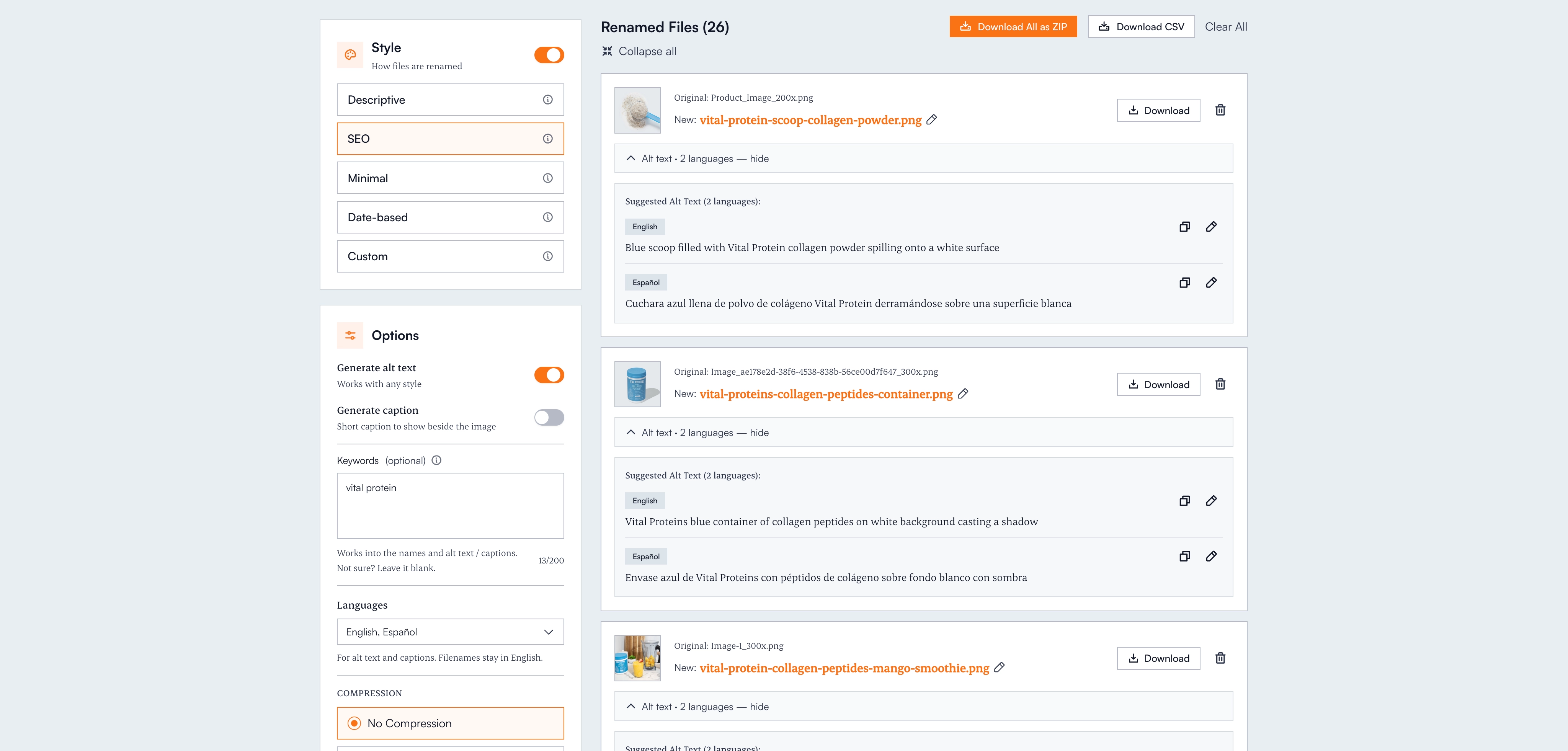
The rules above are easy for one image. The real problem is the product catalog with 600 photos, the portfolio with 1,200, or the blog archive where every post has three images and none have descriptions. Writing one good sentence takes a minute. Writing 600 takes a week, which is why most sites never do it.
This is the job Renameit's free alt text generator exists for. Vision AI looks at what's actually in each image and writes a concise, screen-reader-friendly description for it. You can add keywords (brand names, product names) to anchor the descriptions, every suggestion is editable before you copy or export, and you can get matching SEO-friendly filenames in the same pass. It works in your browser with no signup for your first images, and everything you upload is deleted immediately after processing.
For bigger jobs, the CSV export maps each filename to its alt text (in up to 28 languages on Pro), ready for a CMS import or a developer handoff. The backlog that's been sitting in your "someday" column becomes an afternoon.
The bottom line
Alt text is the rare task where accessibility, classic SEO, and AI search visibility all want the same thing: a clear, honest, one-sentence description of every meaningful image. Describe the content and the purpose, keep it around a sentence, skip the filler, empty-alt the decoration, and put it in your real HTML.
Your images are either describing themselves to screen readers, search engines, and AI assistants, or they're silent. Making them speak is no longer a manual job.
Frequently asked questions
Does alt text help SEO?
Yes. Google's image documentation calls alt text the most important attribute for providing image metadata. It helps images rank in Google Images, reinforces the page's topical relevance, and gives AI search crawlers (which read HTML but rarely run vision models) a text description to work with. It's a light signal on its own that compounds with filenames, captions, and page content.
How long should alt text be?
Aim for one concise sentence, roughly 125 characters or less as a guideline. The claim that screen readers truncate alt text at 125 characters is a myth (testing shows they read all of it), but brevity still matters because listeners can't pause or skim alt text. Google's own style guide recommends 155 characters or less, with longer explanations moved into visible page text.
Should I put keywords in alt text?
Yes, when the keyword honestly describes what's in the image, and only once. 'Modern kitchen with marble island' is good alt text that contains search terms naturally. Stacking keywords ('kitchen remodel kitchen ideas modern kitchen') is keyword stuffing, which Google explicitly warns can make your site look like spam, and it's miserable to listen to through a screen reader.
Should every image have alt text?
Every image should have an alt attribute, but not every image needs text in it. Meaningful images get a descriptive sentence. Purely decorative images (dividers, background flourishes) should get an empty alt="" so screen readers skip them. Never omit the attribute entirely, because screen readers may read the raw filename aloud instead.
What's the difference between alt text, a caption, and the title attribute?
Alt text lives in the HTML alt attribute; screen readers and search engines read it, but sighted visitors normally never see it. A caption is visible text beside the image, written for human readers. The title attribute creates a hover tooltip and is largely ignored by search engines and unreliable for accessibility. For SEO and accessibility, alt text is the one that matters most.
Do ChatGPT and AI search engines read alt text?
Yes. AI crawlers like GPTBot, ClaudeBot, and PerplexityBot parse raw HTML and generally don't run vision models on every image they crawl, so the alt attribute plus the filename is usually the only description of your image they get. Descriptive alt text keeps your visual content legible to AI answers, which is becoming a meaningful traffic source of its own.
Is alt text required by law?
Often, yes. Text alternatives for non-text content are WCAG success criterion 1.1.1, the standard most accessibility law references. The European Accessibility Act has applied to e-commerce and many digital services in the EU since June 28, 2025, with WCAG 2.1 AA as the practical baseline, and missing alt text is one of the most commonly cited failures in US ADA website lawsuits. Whether a specific law covers your business depends on your situation, but descriptive alt text is the expected baseline now.